GHSA-MMH6-5CPF-2C72
Vulnerability from github – Published: 2024-03-25 19:35 – Updated: 2024-03-26 12:58
VLAI
Summary
phpMyFAQ Path Traversal in Attachments
Details
Summary
There is a Path Traversal vulnerability in Attachments that allows attackers with admin rights to upload malicious files to other locations of the web root.
PoC
-
In settings, the attachment location is vulnerable to path traversal and can be set to e.g ..\hacked
-
When the above is set, attachments files are now uploaded to e.g C:\Apps\XAMPP\htdocs\hacked instead of C:\Apps\XAMPP\htdocs\phpmyfaq\attachments
-
Verify this by uploading an attachment and see that the "hacked" directory is now created in the web root folder with the attachment file inside.
Impact
Attackers can potentially upload malicious files outside the specified directory.
Severity
{
"affected": [
{
"package": {
"ecosystem": "Packagist",
"name": "phpmyfaq/phpmyfaq"
},
"ranges": [
{
"events": [
{
"introduced": "3.2.5"
},
{
"fixed": "3.2.6"
}
],
"type": "ECOSYSTEM"
}
],
"versions": [
"3.2.5"
]
}
],
"aliases": [
"CVE-2024-29196"
],
"database_specific": {
"cwe_ids": [
"CWE-22"
],
"github_reviewed": true,
"github_reviewed_at": "2024-03-25T19:35:09Z",
"nvd_published_at": "2024-03-26T03:15:13Z",
"severity": "LOW"
},
"details": "### Summary\nThere is a Path Traversal vulnerability in Attachments that allows attackers with admin rights to upload malicious files to other locations of the web root.\n\n### PoC\n1. In settings, the attachment location is vulnerable to path traversal and can be set to e.g ..\\hacked\n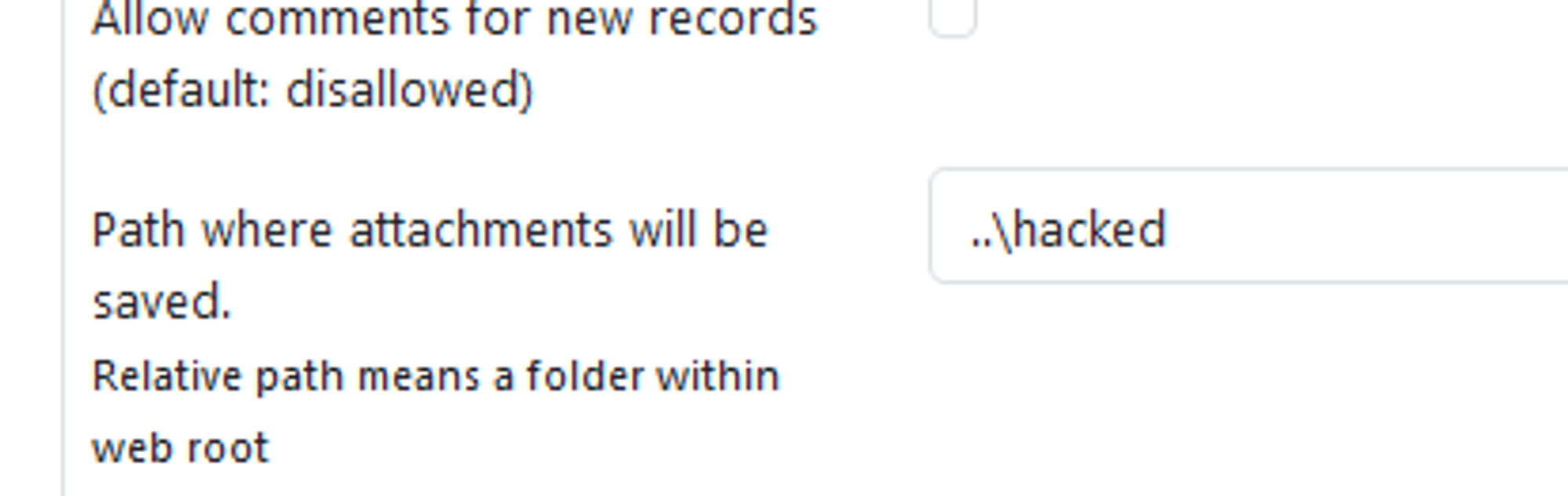\n\n2. When the above is set, attachments files are now uploaded to e.g C:\\Apps\\XAMPP\\htdocs\\hacked instead of C:\\Apps\\XAMPP\\htdocs\\phpmyfaq\\attachments\n\n3. Verify this by uploading an attachment and see that the \"hacked\" directory is now created in the web root folder with the attachment file inside.\n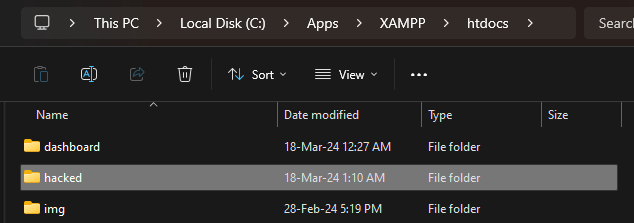\n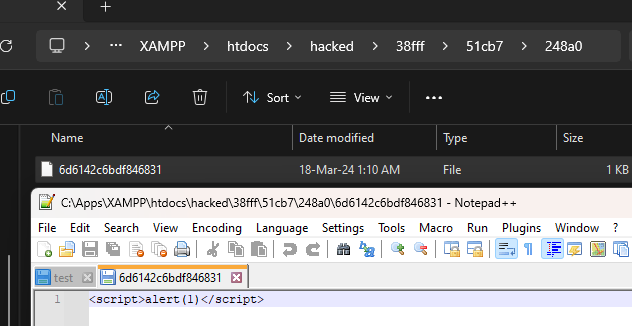\n\n### Impact\nAttackers can potentially upload malicious files outside the specified directory.\n",
"id": "GHSA-mmh6-5cpf-2c72",
"modified": "2024-03-26T12:58:09Z",
"published": "2024-03-25T19:35:09Z",
"references": [
{
"type": "WEB",
"url": "https://github.com/thorsten/phpMyFAQ/security/advisories/GHSA-mmh6-5cpf-2c72"
},
{
"type": "ADVISORY",
"url": "https://nvd.nist.gov/vuln/detail/CVE-2024-29196"
},
{
"type": "WEB",
"url": "https://github.com/thorsten/phpMyFAQ/commit/7ae2559f079cd5fc9948b6fdfb87581f93840f62"
},
{
"type": "PACKAGE",
"url": "https://github.com/thorsten/phpMyFAQ"
}
],
"schema_version": "1.4.0",
"severity": [
{
"score": "CVSS:3.1/AV:N/AC:L/PR:H/UI:N/S:U/C:L/I:L/A:N",
"type": "CVSS_V3"
}
],
"summary": "phpMyFAQ Path Traversal in Attachments"
}
Loading…
Loading…
Experimental. This forecast is provided for visualization only and may change without notice. Do not use it for operational decisions.
Forecast uses a logistic model when the trend is rising, or an exponential decay model when the trend is falling. Fitted via linearized least squares.
Sightings
| Author | Source | Type | Date | Other |
|---|
Nomenclature
- Seen: The vulnerability was mentioned, discussed, or observed by the user.
- Confirmed: The vulnerability has been validated from an analyst's perspective.
- Published Proof of Concept: A public proof of concept is available for this vulnerability.
- Exploited: The vulnerability was observed as exploited by the user who reported the sighting.
- Patched: The vulnerability was observed as successfully patched by the user who reported the sighting.
- Not exploited: The vulnerability was not observed as exploited by the user who reported the sighting.
- Not confirmed: The user expressed doubt about the validity of the vulnerability.
- Not patched: The vulnerability was not observed as successfully patched by the user who reported the sighting.
Loading…
Loading…