GHSA-JRH5-VHR9-QH7Q
Vulnerability from github – Published: 2024-11-13 14:12 – Updated: 2024-11-13 18:58Summary
A vulnerability in CraftCMS allows an attacker to bypass local file system validation by utilizing a double file:// scheme (e.g., file://file:////). This enables the attacker to specify sensitive folders as the file system, leading to potential file overwriting through malicious uploads, unauthorized access to sensitive files, and, under certain conditions, remote code execution (RCE) via Server-Side Template Injection (SSTI) payloads.
Note that this will only work if you have an authenticated administrator account with allowAdminChanges enabled.
https://craftcms.com/knowledge-base/securing-craft#set-allowAdminChanges-to-false-in-production
Details
The issue lies in line 57 of cms/src/helpers/FileHelper.php, it only removes file:// on the most left. It is trivial to bypass this sanitization by adding 2 file://, e.g. file://file:////.
    public static function normalizePath($path, $ds = DIRECTORY_SEPARATOR): string
    {
        // Remove any file protocol wrappers
        $path = StringHelper::removeLeft($path, 'file://');

        // Is this a UNC network share path?
        $isUnc = (str_starts_with($path, '//') || str_starts_with($path, '\\\\'));

        // Normalize the path
        $path = parent::normalizePath($path, $ds);

        // If it is UNC, add those slashes back in front
        if ($isUnc) {
            $path = $ds . $ds . ltrim($path, $ds);
        }

        return $path;
    }
PoC
- Sign in with an admin account and navigate to
Settings → Assets, then create a new volume. - n the Asset Filesystem section, create a new file system and set the Base Path to
file://file:////vendor. Without the prefix, the selection fails.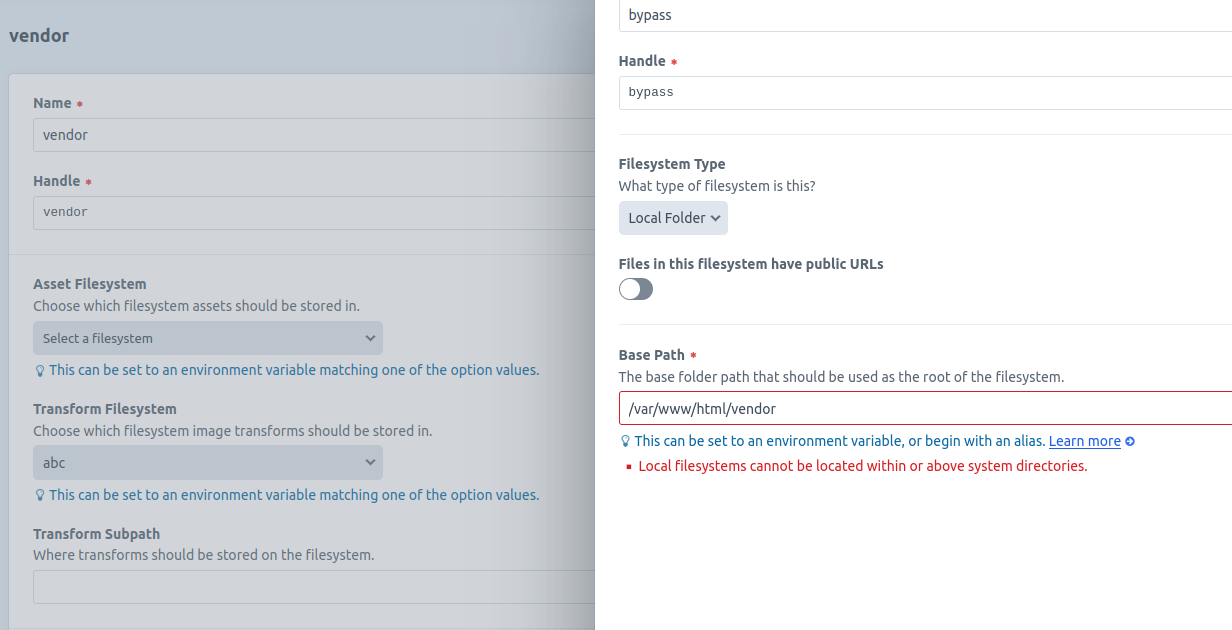 With the double
 file://prefix, the selection succeeds.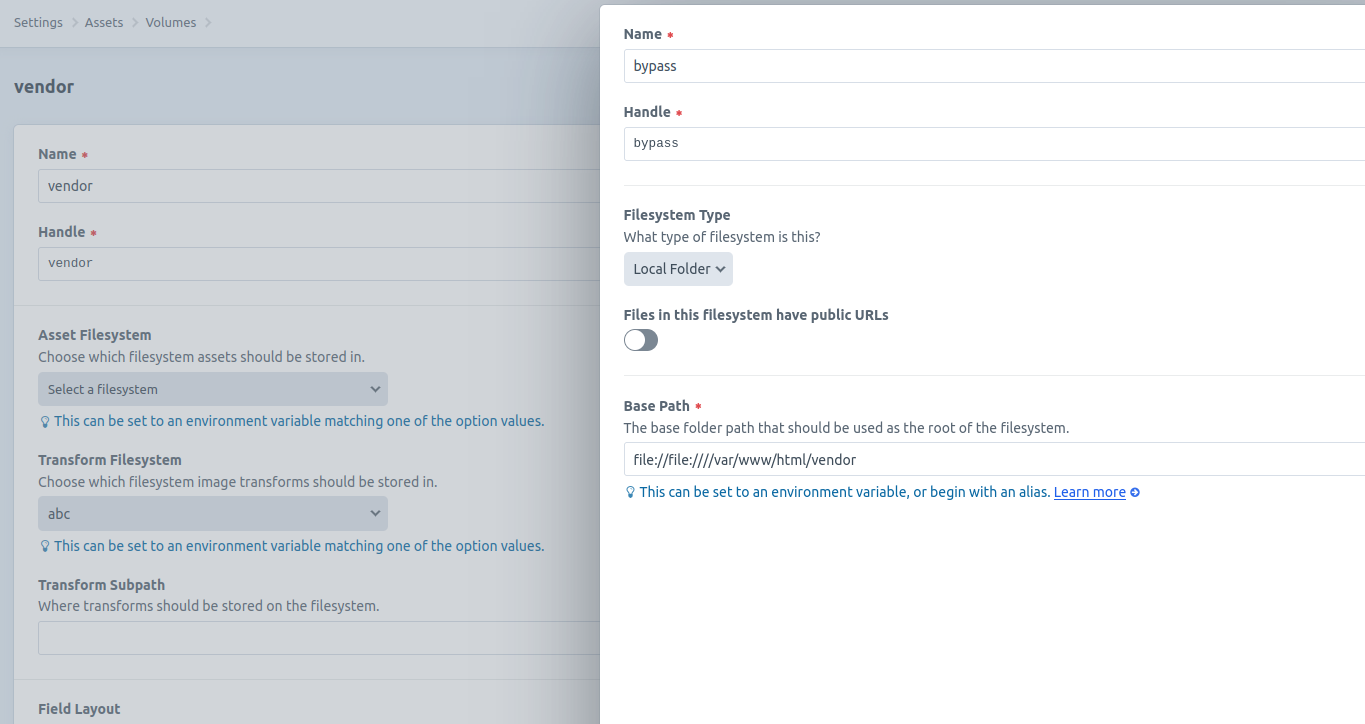
- Access Assets from the left navigation bar, then upload a file into this volume.
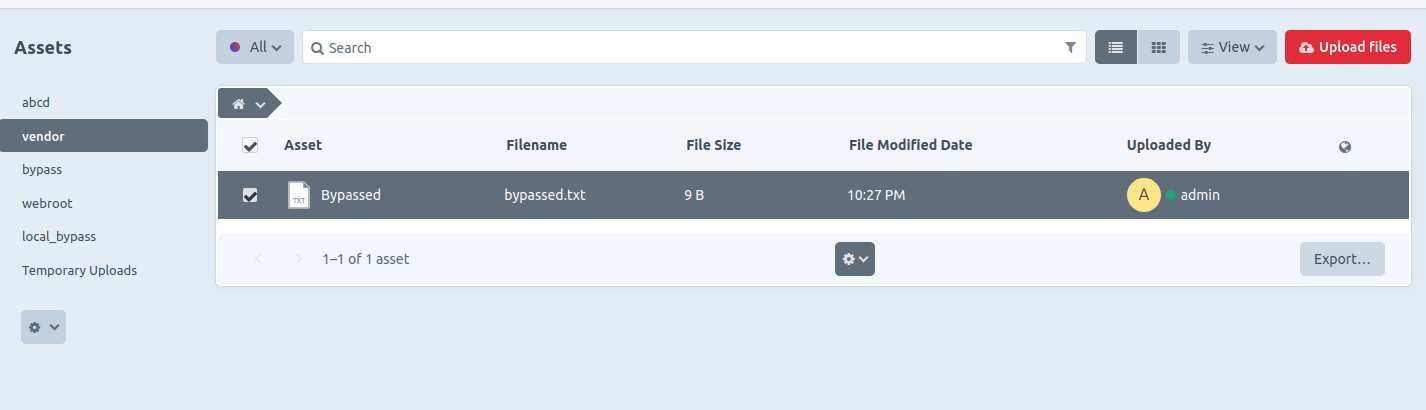
- The file is successfully uploaded and stored in the sensitive folder specified (e.g.,
/vendor).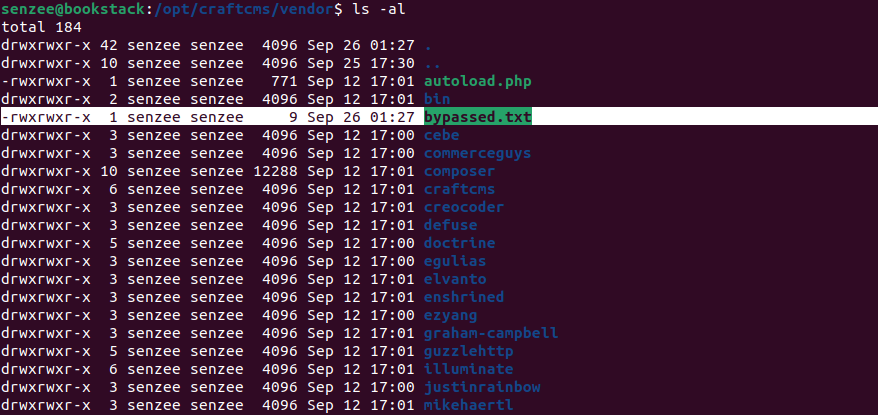
- SSTI payloads can be uploaded to
/templatesfolder, though full code execution was not achieved during testing, some payloads were still successful, leading to sensitive information disclosure, among other potential impacts.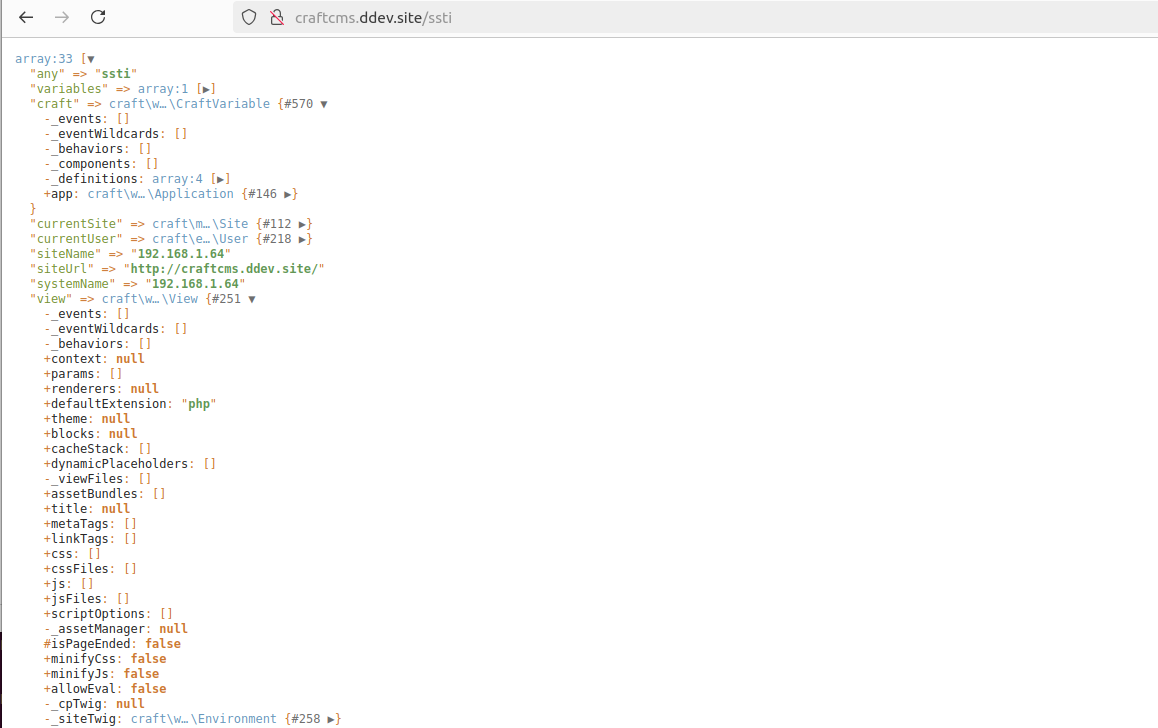
Impact
Attackers who compromise an admin account(The admin user is not equal to the server owner) can exploit this flaw to assign sensitive folders as the base path of the filesystem. For instance, if the path /templates is specified (e.g., file://file:////var/www/html/templates), the attacker could upload SSTI payloads. While CraftCMS includes strict SSTI input sanitization, RCE may still be possible if the attacker can craft a valid payload, as seen in similar vulnerabilities (e.g., GHSA-44wr-rmwq-3phw).
Additionally, attackers can upload tampered files to overwrite critical web application files. By enabling public URLs for files in the specified filesystem, they can also retrieve sensitive files (e.g., configuration files from the local file system).
Although the vulnerability is exploitable only in the authenticated users, configuration with ALLOW_ADMIN_CHANGES=true, there is still a potential security threat.
{
"affected": [
{
"database_specific": {
"last_known_affected_version_range": "\u003c= 5.4.5.1"
},
"package": {
"ecosystem": "Packagist",
"name": "craftcms/cms"
},
"ranges": [
{
"events": [
{
"introduced": "5.0.0-RC1"
},
{
"fixed": "5.4.6"
}
],
"type": "ECOSYSTEM"
}
]
},
{
"database_specific": {
"last_known_affected_version_range": "\u003c= 4.12.4.1"
},
"package": {
"ecosystem": "Packagist",
"name": "craftcms/cms"
},
"ranges": [
{
"events": [
{
"introduced": "4.0.0-RC1"
},
{
"fixed": "4.12.5"
}
],
"type": "ECOSYSTEM"
}
]
}
],
"aliases": [
"CVE-2024-52291"
],
"database_specific": {
"cwe_ids": [
"CWE-22"
],
"github_reviewed": true,
"github_reviewed_at": "2024-11-13T14:12:36Z",
"nvd_published_at": "2024-11-13T17:15:12Z",
"severity": "HIGH"
},
"details": "### Summary\nA vulnerability in CraftCMS allows an attacker to bypass local file system validation by utilizing a double `file://` scheme (e.g., `file://file:////`). This enables the attacker to specify sensitive folders as the file system, leading to potential file overwriting through malicious uploads, unauthorized access to sensitive files, and, under certain conditions, remote code execution (RCE) via Server-Side Template Injection (SSTI) payloads.\n\nNote that this will only work if you have an authenticated administrator account with [allowAdminChanges enabled](https://craftcms.com/docs/5.x/reference/config/general.html#allowadminchanges).\n\nhttps://craftcms.com/knowledge-base/securing-craft#set-allowAdminChanges-to-false-in-production\n\n### Details\nThe issue lies in line 57 of `cms/src/helpers/FileHelper.php`, it only removes `file://` on the most left. It is trivial to bypass this sanitization by adding 2 `file://`, e.g. `file://file:////`.\n```php\n public static function normalizePath($path, $ds = DIRECTORY_SEPARATOR): string\n {\n // Remove any file protocol wrappers\n $path = StringHelper::removeLeft($path, \u0027file://\u0027);\n\n // Is this a UNC network share path?\n $isUnc = (str_starts_with($path, \u0027//\u0027) || str_starts_with($path, \u0027\\\\\\\\\u0027));\n\n // Normalize the path\n $path = parent::normalizePath($path, $ds);\n\n // If it is UNC, add those slashes back in front\n if ($isUnc) {\n $path = $ds . $ds . ltrim($path, $ds);\n }\n\n return $path;\n }\n```\n\n### PoC\n1. Sign in with an admin account and navigate to `Settings \u2192 Assets`, then create a new volume.\n2. n the Asset Filesystem section, create a new file system and set the Base Path to `file://file:////vendor`.\nWithout the prefix, the selection fails.\n \nWith the double `file://` prefix, the selection succeeds.\n \n3. Access Assets from the left navigation bar, then upload a file into this volume.\n \n4. The file is successfully uploaded and stored in the sensitive folder specified (e.g., `/vendor`).\n \n5. SSTI payloads can be uploaded to `/templates` folder, though full code execution was not achieved during testing, some payloads were still successful, leading to sensitive information disclosure, among other potential impacts.\n \n\n### Impact\nAttackers who compromise an admin account(The admin user is not equal to the server owner) can exploit this flaw to assign sensitive folders as the base path of the filesystem. For instance, if the path `/templates` is specified (e.g., `file://file:////var/www/html/templates`), the attacker could upload SSTI payloads. While CraftCMS includes strict SSTI input sanitization, RCE may still be possible if the attacker can craft a valid payload, as seen in similar vulnerabilities (e.g., [GHSA-44wr-rmwq-3phw](https://github.com/advisories/GHSA-44wr-rmwq-3phw)).\n\nAdditionally, attackers can upload tampered files to overwrite critical web application files. By enabling public URLs for files in the specified filesystem, they can also retrieve sensitive files (e.g., configuration files from the local file system).\n\nAlthough the vulnerability is exploitable only in the authenticated users, configuration with `ALLOW_ADMIN_CHANGES=true`, there is still a potential security threat.\n\n",
"id": "GHSA-jrh5-vhr9-qh7q",
"modified": "2024-11-13T18:58:32Z",
"published": "2024-11-13T14:12:36Z",
"references": [
{
"type": "WEB",
"url": "https://github.com/craftcms/cms/security/advisories/GHSA-jrh5-vhr9-qh7q"
},
{
"type": "ADVISORY",
"url": "https://nvd.nist.gov/vuln/detail/CVE-2024-52291"
},
{
"type": "PACKAGE",
"url": "https://github.com/craftcms/cms"
}
],
"schema_version": "1.4.0",
"severity": [
{
"score": "CVSS:3.1/AV:N/AC:L/PR:H/UI:R/S:C/C:H/I:H/A:H",
"type": "CVSS_V3"
},
{
"score": "CVSS:4.0/AV:N/AC:L/AT:P/PR:H/UI:A/VC:H/VI:H/VA:H/SC:H/SI:H/SA:H/E:P",
"type": "CVSS_V4"
}
],
"summary": "Local File System Validation Bypass Leading to File Overwrite, Sensitive File Access, and Potential Code Execution"
}
Sightings
| Author | Source | Type | Date | Other |
|---|
Nomenclature
- Seen: The vulnerability was mentioned, discussed, or observed by the user.
- Confirmed: The vulnerability has been validated from an analyst's perspective.
- Published Proof of Concept: A public proof of concept is available for this vulnerability.
- Exploited: The vulnerability was observed as exploited by the user who reported the sighting.
- Patched: The vulnerability was observed as successfully patched by the user who reported the sighting.
- Not exploited: The vulnerability was not observed as exploited by the user who reported the sighting.
- Not confirmed: The user expressed doubt about the validity of the vulnerability.
- Not patched: The vulnerability was not observed as successfully patched by the user who reported the sighting.

The approach is described in our paper Mapping CVEs to MITRE ATT&CK Techniques: A Curated Gold-Set Classifier and the Limits of LLM-Assisted Label Expansion.
Browse all ATT&CK techniques and the vulnerabilities related to each.
Related by attack behaviour
Vulnerabilities whose description is nearest to this one in the vector space of the CIRCL/vulnerability-attack-technique-biencoder model. This is a similarity search over the bi-encoder space (plain cosine), not a classification, and it has no measured accuracy.